🔋 Charging & Battery Guide
⚙️ Overview
The RoBeeX AI Drone Kit includes a rechargeable LiPo Battery that powers your drone.
WARNING
Never use non-RoBeeX batteries. Visit www.robeex.com to purchase official replacements.
🔌 Charging Instructions
🎥 Video Guide: How to Charge the Battery
WARNING
Do not charge the battery immediately after flight — allow it to cool first.
Use a USB Type-A charger rated 5V @ 2A or above.
Connect the charger to a USB power source.
Plug the provided charging cable into the charger board and the battery.
Always use the official charging cable from your RoBeeX kit.
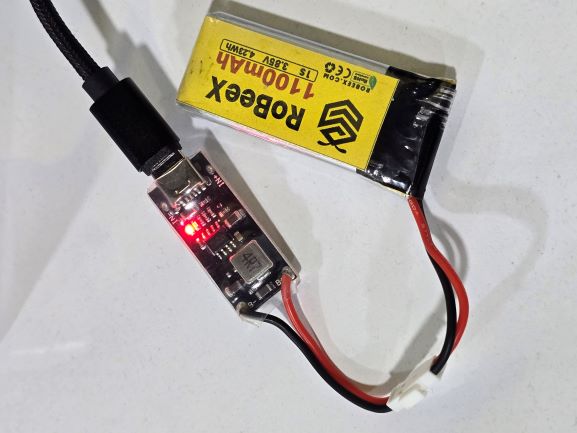
LED indicators on the charger board:
🔴 Red light: Battery is charging
🟢 Green light: Battery is Fully charged
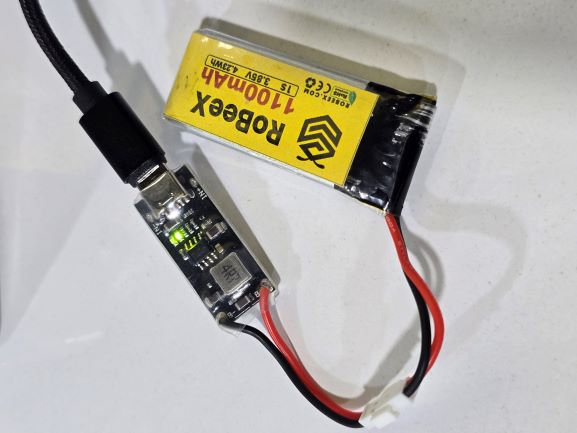
When the LED turns green, disconnect the battery from the charger board.
WARNING
Do not leave the battery connected for a long time after it’s fully charged.
🔧 Adjust the Charger Connector Pins
If you cannot connect the battery to the charger, or if inserting the battery feels difficult, you can adjust the pin positions using the tweezers included in the package.
WARNING
⚠️ DO NOT touch the charger pins while the charger is connected to a power source.
🧭 Inserting the Battery
Insert the Battery into the aircraft as shown in the video below.
WARNING
Ensure the battery is properly mounted and cannot move before flight.
🎥 Video Guide: How to install the battery
🔋 Check Battery Charge Level
You can check the battery charge percentage in two ways:
Checking on RoBeeX App Software
Open the RoBeeX App and view the battery status on the main screen.
Checking with the Switch on the RoBeeX main Board
INFO
To check the battery charge manually:
Press the switch (SW1) on the RoBeeX main board briefly, then release it.
The RGB1 – RGB4 LEDs will light up to show the current battery charge level.LED Indicators
RGB1 RGB2 RGB3 RGB4 Charge Level 🟢 GREEN 🟢 GREEN 🟢 GREEN 🟢 GREEN 100% 🟢 GREEN 🟢 GREEN 🟢 GREEN ⚫ OFF 75% 🟢 GREEN 🟢 GREEN ⚫ OFF ⚫ OFF 50% 🟢 GREEN ⚫ OFF ⚫ OFF ⚫ OFF 25% 🔴 RED 🔴 RED 🔴 RED 🔴 RED 5% (Low battery – please recharge)
🎥 Video Guide: How to Check Battery Charge Level (Video Shows 75%)
TIP
Always make sure to check the battery charge level before each flight to ensure safe operation.
🚨 Battery Warnings During Flight
TIP
Before every flight, make sure the battery is fully charged using the provided charger and cable.
WARNING
🔋Low Battery Warning & Haptic Feedback:
- ⚠️ 30% Charge (Alert): When the battery level drops to 30%, the connected mobile device or tablet will provide slow haptic (vibration) feedback. This is your primary alert to promptly land the aircraft to prevent further power loss and an uncontrolled descent.
- 🚨 <15% Charge (CRITICAL): When the battery level is below 15%, the haptic feedback will become intense, signaling a critical low battery state and requiring immediate landing.
🚨DANGER
⚠️🔥 Never use or charge swollen, leaky, or damaged Flight Batteries. Batteries in this compromised state pose a severe risk of catching fire.
🧊 Storage Recommendations
If the battery will not be used for 10 days or more, keep its charge level between 30% - 60%.
Store the battery in a cool (22°C – 28°C), dry place away from direct sunlight.
⚠️ Safety & Caution
Please follow these important battery safety instructions:
WARNING
⚠️ Safety Notices
❌ Do not crash, puncture, crush, or bend the battery.
🔥 Keep the battery away from fire, heat, and direct sunlight.
⚡ Do not short-circuit the terminals.
🚯 Do not throw the battery in trash or water.
⚙️ Use only the provided charger board and cable.
🚫 Do not use other chargers or damaged cables.
🕒 Never leave the battery unattended while charging.
🌡️ Charge only in the temperature range of 22°C – 28°C.
❄️ Wait until the battery cools to room temperature after flight before charging.
👶 Keep batteries out of reach of children and pets.